
Free up disk space without ads or offers
Windows and your programs leave behind temporary files, update leftovers and caches that can quietly grow to several gigabytes. Clean Disc finds them, shows exactly what is there, and cleans only when you say so.
- Free
- No ads
- No offers
- Sends nothing about you
Three steps, and you are in control the whole way
-
Investigate
Clean Disc looks through a fixed list of safe locations. Nothing is deleted at this stage.
-
Review
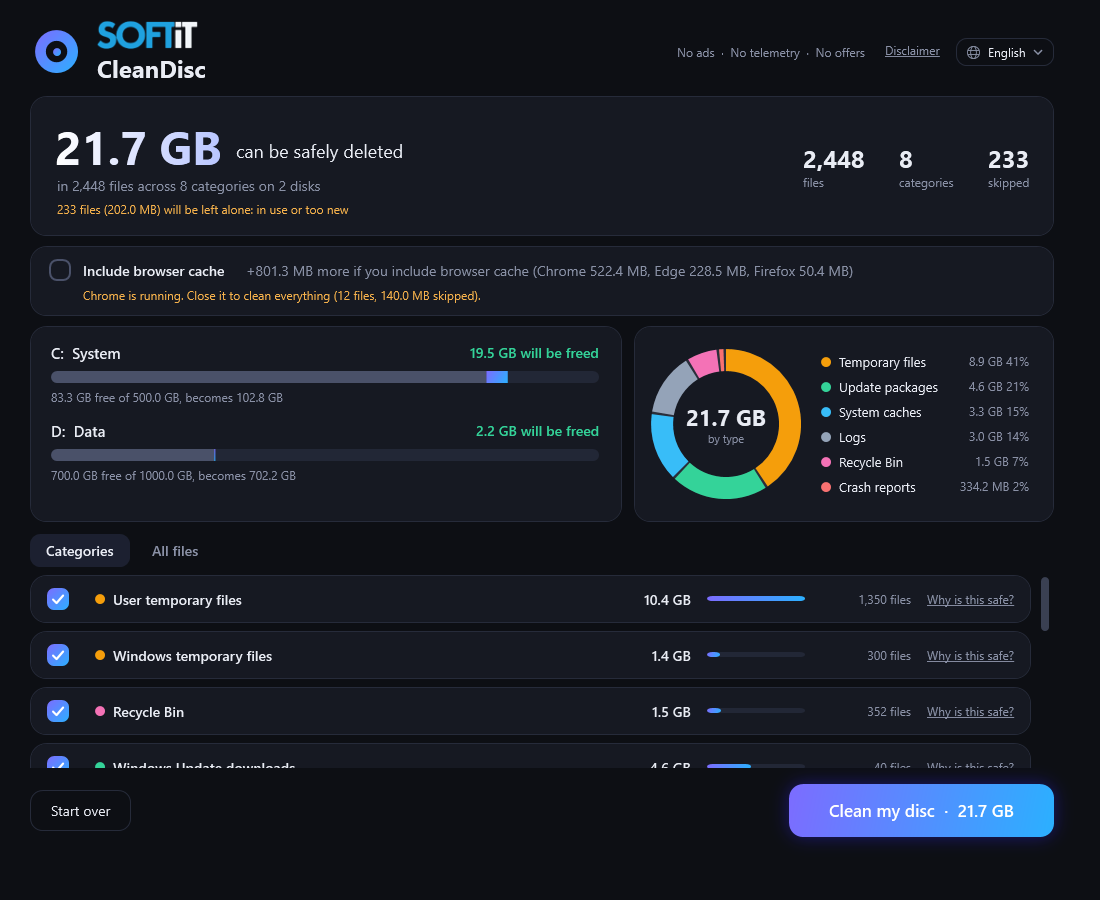
See how much each disk can free, split by type, and browse every single file on the list.
-
Clean my disc
The button appears only after Investigate. Each file is checked again right before it is removed, and files in use are skipped.
Simple, honest and careful
-
Proof, not guesses
Clean Disc only cleans folders on a built-in allowlist. Each category explains why it is safe and links to documentation from Microsoft, Chromium or Mozilla.
-
You see every file first
Investigate lists the files with their size, age and type, per disk, before anything is removed.
-
Checked twice
Every file passes the same safety checks at Investigate and again when cleaning: protected names, links, system files, minimum age, files in use, and unchanged since Investigate.
-
Your browser is left alone
Cache for Chrome, Edge and Firefox is an optional checkbox that is off by default. Cookies, passwords, history and bookmarks are never touched.
-
Quiet and private
No ads, no account and no tracking. The program sends nothing about you or your PC. A log of each clean stays on your PC.
-
Speaks your language
Swedish, Norwegian, Danish, Finnish, German, English, French, Spanish and Portuguese. Switch at any time.
What Clean Disc cleans
Only temporary files and caches, the kind that Windows and your browser refill by themselves when needed. The browser cache is optional.
- User temporary files
- Windows temporary files
- Recycle Bin
- Windows Update downloads
- Delivery Optimization cache
- Error reports and crash dumps
- Thumbnail cache
- DirectX shader cache
- Browser cache (optional)
What Clean Disc never touches
Anything that is not on the allowlist is left alone.
- Your documents, photos, music and videos
- Your Desktop and Downloads folders
- Cookies, saved passwords, history and bookmarks
- Programs and Windows system files
- Files that are in use by another program
Requirements
- 64-bit Windows 10 or Windows 11
- Administrator rights, needed to clean system folders such as Windows Temp
- About 150 MB of disk space. .NET is included, so there is nothing else to install
Frequently asked questions
Is Clean Disc really free?
Yes. It is free to download and use. There is no trial period, no paid version and no account.
Does Clean Disc collect data or use the internet?
No, it collects no data and sends nothing about you. When the program starts it asks cleandisc.softit.se which version is the latest, so it can show an Update button. That request contains nothing about you or your PC, and nothing else is ever sent.
How can I know the deleted files are not needed?
Clean Disc only cleans locations on a built-in allowlist, such as temporary folders, update downloads and caches. Every file is checked again right before deletion. No cleaner can give an absolute guarantee, which is why you see the full list first and decide yourself.
Can I undo a clean?
No. Files are deleted permanently and the Recycle Bin is emptied. That is why Investigate comes first and shows the complete list. Keep backups of anything that matters to you.
Why does it need administrator rights?
Some of the folders it cleans, such as Windows Temp and Windows Update downloads, are protected. Without administrator rights the program cannot clean them.
Ready for a cleaner disk?
Download Clean Disc, run Investigate and look at the list. You decide what happens next.